|
Dreamweaver CS5/SubVersion Integration - Client setup
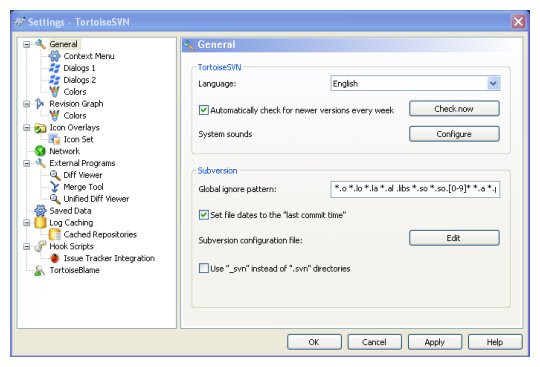
Our client machine, the one with Dreamweaver installed on it and where the local mirror of our website was, is a Windows XP machine. Although Dreamweaver has support for working with a Subversion repository, it has no support for getting the project into the repository in the first place and for this we needed to install a Subversion client to talk to the server. [Note: this page is also applicable for setting up SVN for use with other HTML editors such as SeaMonkey] Here's what we needed to do: Install Tortoise SVN, which is a Subversion client enabled as a Windows shell extension. Edit the settings Start Menu-All Programs-TortoiseSVN-Settings to ensure that the box was checked to set the file date to "last commit time". (We failed to do this initially, with the result that every time a fresh working copy was created all the files dates were changed to today, creating huge confusion with site synchronisation and with the modification dates in our site map). This has to be done separately for each user!
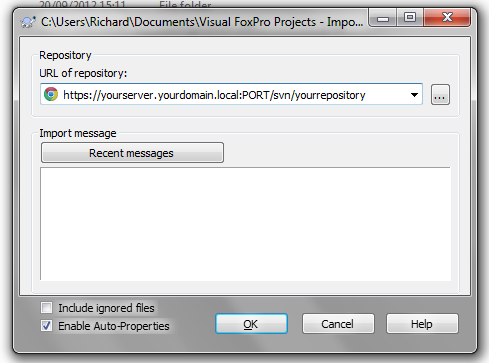
Import the local mirror of our website into the repository trunk directory, by right clicking on the root directory and using the Tortoise SVN-Import command. Delete the local mirror - after taking a backup, of course. Initially we failed to do this and checked the files back out again on top of the old copy instead of creating fresh directories with a working copy for each user. Had the files not been checked back out from the repository the directory could have been deleted in the usual way. As they had been, we needed to right click on the folder and use the Tortoise SVN-Update to Revision command, selecting Exclude from the drop down menu. This removed the folder and all its contents from version control allowing it to be deleted safely without impacting on the contents of the repository. The next step was to set up Dreamweaver to work with Subversion. [Alternatively, proceed with a different HTML editor such as SeaMonkey]
|
| Related pages |
| Desktop virtualisation with a tablet PC Step-by-Step Guide to virtualising a physical machine What is Virtualisation and how it can help a Small Business? |